

If you manage social accounts in HubSpot, this is a small but useful update.
Social settings have been simplified and moved to a single Accounts page.
Previously, checking something as basic as which accounts were connected or expired often required clicking through multiple tabs. If publishing stopped, it was not always clear where to look first.
That has now been streamlined.
What is different now
All social account management is now in one place:- All social account connections are managed from the Accounts page.
- Accounts are grouped by social network, making them easier to scan.
- Connection status is clearly visible (Active, Expired, Expiring).
- Re-authentication is easier to spot when publishing stops.
If you are responsible for keeping multiple accounts connected, this eliminates a lot of unnecessary checking.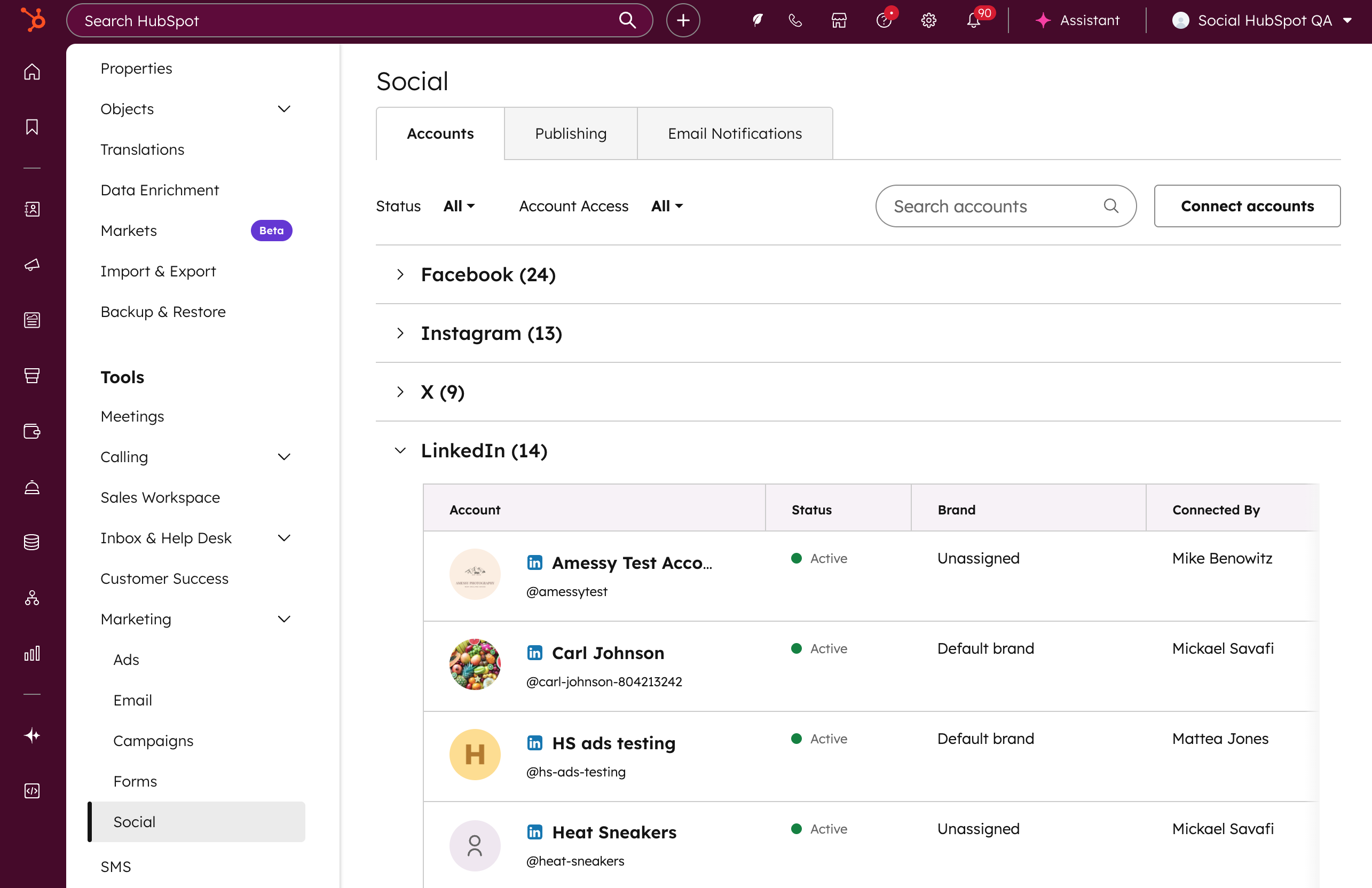
Fewer tabs, same functionality
The separate Social Inbox and Follow Me settings tabs have been removed.
No functionality has been removed – everything remains the same and is now consolidated on the Accounts page. The Follow Me module now appears below the accounts table, with a link to Content Hub if additional access is needed.
This is not a major new feature and does not change how Social Hub works day to day.
But for anyone managing social accounts in HubSpot, it means less friction, fewer missed expirations, and one less thing to worry about during a busy week.
Get in touch
Need help with HubSpot? Feel free to send us an email to hubspot@actuado.com