For many teams using HubSpot, work does not stop when leaving the office.
Whether preparing for meetings, reviewing CRM records while travelling, or responding quickly between calls, mobile usability has become increasingly important.
HubSpot is now introducing several updates across both the HubSpot mobile app and the Breeze Assistant mobile app to make working on the go smoother and more efficient.
HubSpot Mobile App Gets a Refreshed Interface
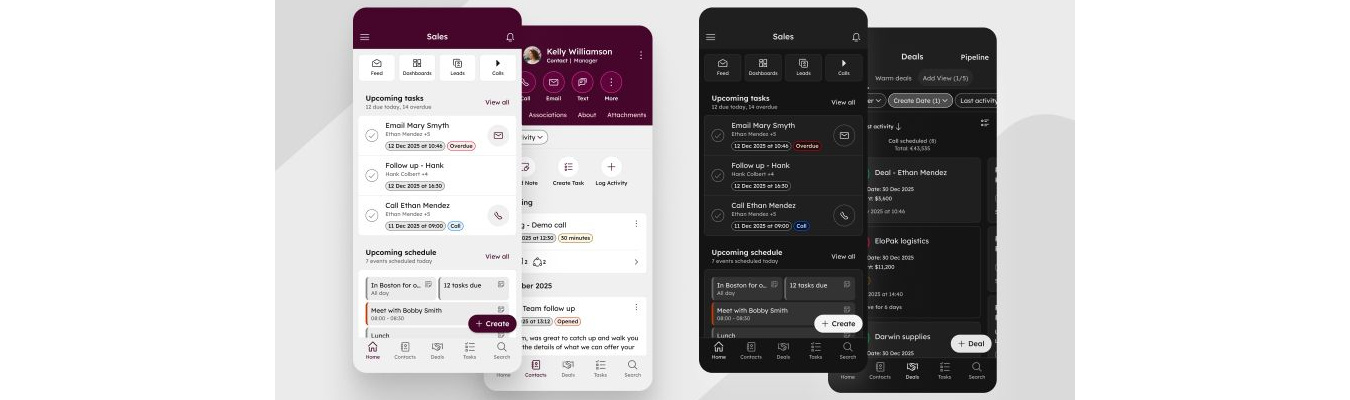
The HubSpot mobile app now includes an updated design aligned with the new desktop experience.
The update focuses on:
- cleaner navigation
- improved readability
- reduced visual clutter
- updated light and dark mode support
If the new desktop theme is enabled in your portal, the mobile app automatically adopts the same visual style, creating a more consistent experience across devices.
For teams frequently switching between desktop and mobile, this helps reduce friction and improves usability throughout the day.
Breeze Assistant Becomes More Accessible on Mobile
HubSpot is also expanding the mobile capabilities of Breeze Assistant.
With new Mobile Widgets and App Intents, users can now:
- add Breeze Assistant directly to their home screen
- launch prompts instantly from shortcuts or device search
- dictate questions or trigger actions with a single tap
This removes several steps from the process and makes AI assistance more accessible in real-world situations, especially while travelling or immediately before meetings.
Instead of opening the full application and navigating menus, users can interact with the assistant much more quickly.
Conversation Starters for Custom AI Assistants
Another useful addition is the introduction of Conversation Starters for custom AI assistants inside the Breeze mobile app.
When opening a custom assistant, users now immediately see suggested prompts tailored to that assistant.
This helps:
- new users understand the assistant’s purpose faster
- reduce blank-page friction
- encourage faster adoption
- start productive conversations more quickly
Small UX Changes with Practical Impact
While these updates may appear incremental individually, together they significantly improve the mobile HubSpot experience.
The result is:
- faster access to CRM information
- more fluid mobile workflows
- easier AI interaction on the go
- less friction between desktop and mobile usage
For teams relying heavily on HubSpot throughout the day, these kinds of usability improvements often have a meaningful operational impact.
Availability
The updates are available through the latest versions of:
- the HubSpot mobile app
- the Breeze Assistant mobile app
Both apps are available on iOS and Android.
#HubSpot #BreezeAssistant #MobileProductivity #SalesEnablement #MarketingOps #Actuado